Secure SaaS Applications with IP Allowlisting
Protect SaaS Applications by enabling Device Trust and Continuous Authorization via IP Allowlisting
- Last validated: Aug 3, 2026
- 5 minutes to read
-
Contributors

- Overview
- How it works
- Specifying IP Allowlists
- Edge Network IP Address
- Per-identity-provider guides
- What’s next
Overview
This guide explains the IP Allowlisting approach to securing SaaS applications: traffic to the application is routed through CSE so that it egresses from a known CSE Edge IP address, and the application is configured to accept logins only from that address. The result is that only devices connected through CSE can reach the application.
IP Allowlisting is one of the two independent techniques CSE offers for SaaS applications. It is lighter-weight and per-application, and it works for any application that supports an IP allowlist — including applications that are not federated with an Identity Provider. For sign-in-time device trust across all applications behind an IdP, see IdP Federation instead; the two techniques can also be combined.
Doc status: CSE-side steps reviewed 2026-06-29. The third-party IdP console steps follow the vendor’s own documentation and should be confirmed against the live admin console, which can change without notice.
How it works
Service Tunnels use WireGuard to create fast, secure tunnels utilizing state-of-the-art cryptography. A service tunnel provides network-level connectivity into private networks as well as the public internet. When you specify the Public CIDRs and/or Public Domains that comprise a SaaS application in your service tunnel configuration, traffic to that SaaS application automatically flows over the tunnel and egresses with the IP address of your Edge.
This allows you to enforce Device Trust and Continuous Authorization on SaaS applications that have no native concept of either: by routing all SaaS traffic through CSE and pinning the application’s IP allowlist to the CSE Edge egress address, only devices connected through CSE can reach the application, and any device that loses its trusted connection loses access.
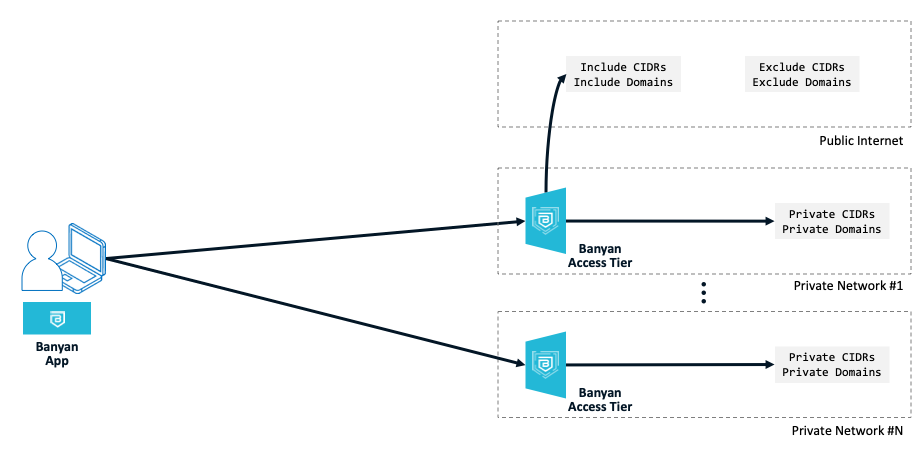
For Self-hosted Private Edge deployments, traffic to Public CIDRs and Public Domains flows through a selected Access Tier(s).
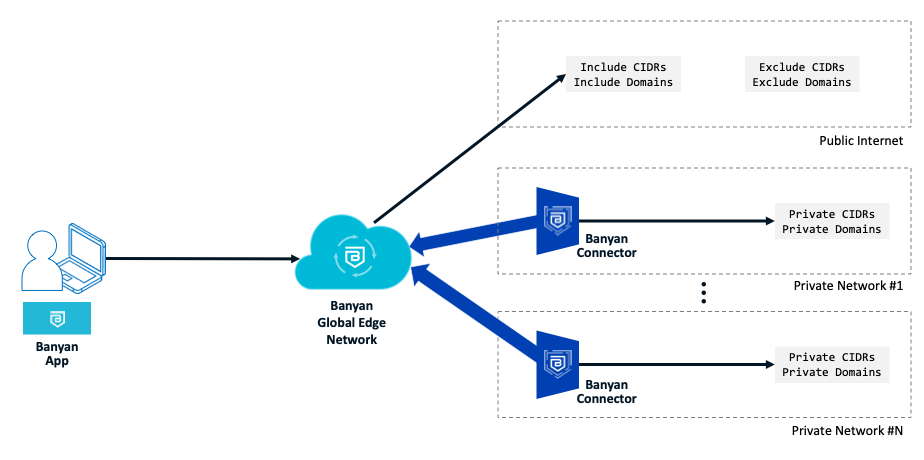
For Global Edge deployments, traffic to Public CIDRs and Public Domains flows through the Global Edge Network.
Specifying IP Allowlists
Most SaaS Applications provide security configuration allow you restrict connectivity to your tenant to specified IP address ranges. SaaS vendors use different terminology to refer to IP Allowlisting. The goal of this step is to configure the SaaS application so that it only accepts logins originating from your CSE Edge Network egress IP address (see Edge Network IP Address below), which effectively gates the application behind CSE.
The IP allowlisting controls below live in each SaaS vendor’s own admin console, which CSE does not control. The exact setting names and navigation can change without notice, so treat the vendor’s official documentation as the source of truth for their UI.
Example 1: Salesforce
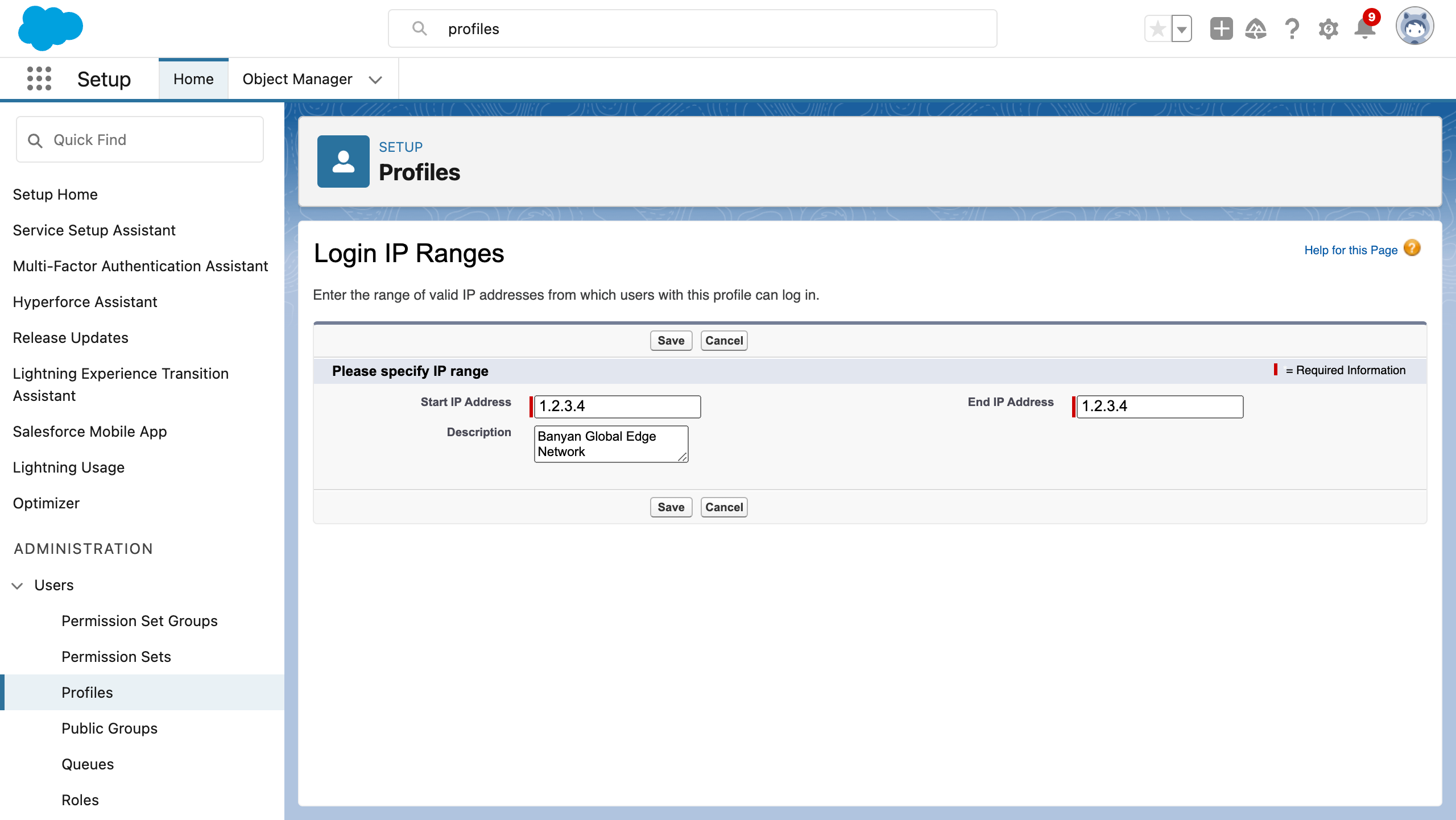
In Salesforce, you can restrict access to specific IP ranges by updating the Login IP Ranges setting. Refer to Salesforce’s documentation for the current location of this setting.
Example 2: Mongo Cloud
In Mongo Cloud, you can restrict access to specific IP ranges by updating the IP Access List setting. Refer to MongoDB’s documentation for the current location of this setting.
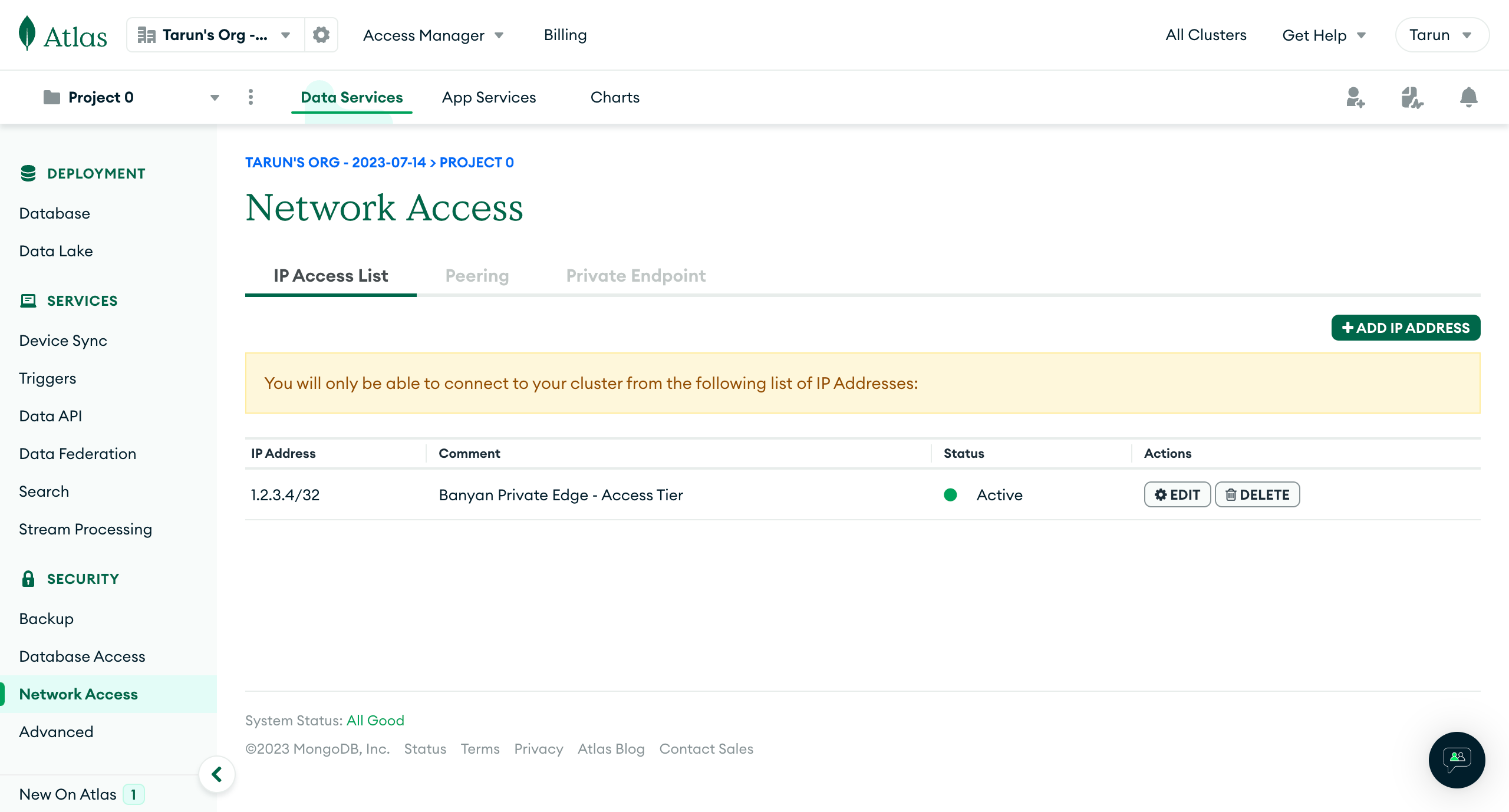
In both the examples above, access has been restricted to a fictitious IP range 1.2.3.4/32.
Edge Network IP Address
The IP addresses with which service tunnel traffic egresses your CSE Edge Network depends on your deployment model. These egress IPs are the values you enter into the SaaS application’s IP allowlist above, so that the application only trusts traffic that has passed through CSE.
For Self-hosted Private Edge deployments, traffic to Public CIDRs and Public Domains flows through a selected Access Tier(s). Your Egress IPs which match those of your Access Tier(s).
For Global Edge deployments, traffic to Public CIDRs and Public Domains flows through the Global Edge Network. Your Egress IPs will be those used by the Global Edge Network and are documented here.
Per-identity-provider guides
What’s next
Once you’ve enabled IP Allowlisting for a given SaaS Application by configuring the network access setting in the SaaS application, review our article on tunneling the SaaS application traffic over a Service Tunnel.